Point Cloud Denoising Now Available in the NavLive Portal
Your building scans just got a whole lot sharper. With one click, the NavLive Portal can now automatically clean and optimise your point clouds, removing noise, tightening surface planes, and giving you a crisper, clearer result to draw from.
Point cloud data captured in the real world is never perfectly clean. Reflective surfaces, dust particles, scanner movement, and environmental clutter all introduce small errors and stray points that can make your cloud look fuzzy or messy, especially when you zoom in to trace detail.
Point Cloud Denoising in NavLive changes that. It runs directly inside your Portal account and works automatically. There are no settings to tweak, no expertise required.
The result is a tidier, more structured cloud with thinner, crisper surface planes. Lines that were slightly blurred become sharper. Clutter that was hiding your walls and floors is stripped away. Everything just reads more clearly, and you can draw from it faster and with greater confidence.
One Button is All It Takes.
We’ve made our denoising process as simple as possible.
In the NavLive Portal, every scan now has a Magic Wand () button. You’ll find it in the top-right corner of any point cloud view, or directly on any scan tile in your scan list.
Press the wand button, hit “Confirm”, and NavLive handles the rest. Your scan is queued and processed in the cloud, and you’ll see a progress indicator and an estimated time to completion. You can close the dialog and carry on working in the Portal; the wand icon will turn green when denoising is done.

Processing time depends on the size of your scan, but as a general guide expect around 10 minutes per gigabyte. For most typical building scans that’s a very short wait for a meaningful improvement.
- Works on all your scans: Including legacy scans already in your account. There’s no need to re-capture anything — just open any existing scan and hit the wand.
- Original always preserved: Your original point cloud is never overwritten. Toggle between the original and optimised views at any time using the wand icon.
- Export both versions: You can export the denoised cloud for use in third-party applications — great for slicing, tracing, and detailed drawing workflows outside the Portal.
- Process in the background: No need to sit and wait. Close the dialog and continue working until your optimised cloud is ready.
Point Cloud Denoising is available right now in your NavLive account — on every scan you’ve ever captured. Look for the Magic Wand button and try it on any scan today.
What This Update Means for Your Workflow
The cleaner your point cloud, the easier it is to draw from accurately. When surface planes are tight and crisp, snapping to walls, floors, and structural elements becomes more reliable. That means fewer corrections, less time second-guessing your traces, and drawings that more faithfully reflect what’s actually there.
For teams doing high-volume survey work, the cumulative time saving can be significant. Even shaving a few minutes per drawing adds up quickly when you’re processing at scale.
Your denoised point cloud can also be exported and brought into third-party packages for slicing and detailed drawing creation, useful if your workflow involves CAD or BIM tools alongside NavLive.
A Few Things Worth Knowing
As with any processing step, there are a couple of nuances to be aware of. Denoising focuses on removing small scattered points and tightening surface planes. It won’t remove large structural elements or significant reflections. In some cases, you may notice a very slight crosshatch texture in the optimised cloud, though this is unlikely to affect most drawing workflows.
Portal slices are currently generated from the original cloud rather than the denoised version, but you can export the denoised cloud to slice in third-party tools if needed. We’re continuing to develop the feature and plan to bring more of the Portal’s tools in line with the denoised data soon.
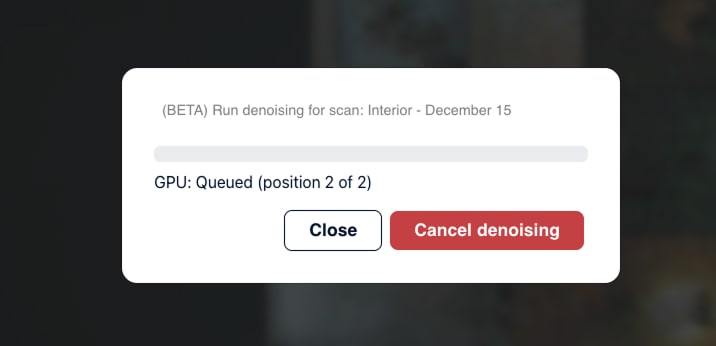
If the denoising system is busy when you submit a scan, it’ll be placed in a short queue and begin processing as soon as capacity is available (see screenshot above). The wand icon keeps you informed throughout.
Try Point Cloud Denoising Now
Point Cloud Denoising is live in your NavLive Portal account today.
To try it out for yourself, simply log in to your account, open any scan (new or old), and press the Magic Wand button to get started.